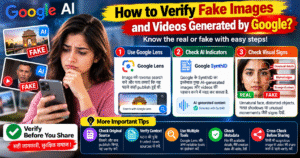
🔍 How to Verify Fake Images and Videos Generated by Google AI?
Google AI tools can generate realistic images and videos that look like genuine photographs or real-world footage. However, these visuals may contain misleading details, synthetic faces, or events that never happened. Before trusting or sharing an image or video, it is important to verify its source, context, and authenticity.
🖼️ 1. Use Google Lens for Reverse Image Search
Google Lens can help you find visually similar images and identify where an image may have appeared online. Upload the image or use the Lens option to search for matching visuals, earlier versions, and related sources.
Tip: A matching result does not automatically prove that an image is genuine. Check the original source and publication date.
🔎 2. Check Google AI Content Indicators
Google has developed technologies such as SynthID to embed imperceptible watermarks in certain AI-generated images, audio, and videos. Supported Google tools may help identify content created using Google’s AI systems.
Look for available AI-content verification features in the relevant Google tool. Remember that detection support varies by format and tool, and the absence of a detected watermark does not prove that content is authentic.
🎥 3. Inspect Videos Carefully
AI-generated videos may contain visual inconsistencies, unnatural movements, distorted objects, inconsistent reflections, or unusual transitions. Audio may also have unnatural timing or mismatched lip movements.
These signs can help you identify suspicious content, but modern AI videos can look highly realistic. Visual inspection alone is not a reliable verification method.
🌐 4. Verify the Original Source
Check who published the image or video, when it first appeared, and whether reputable news outlets or official sources confirm the event. Search for the same scene using different keywords and compare available versions.
Be cautious when a dramatic image or video appears only on unknown accounts without credible supporting evidence.
🛡️ 5. Use Multiple Verification Methods
- 🔍 Reverse Image Search: Find visually similar images and earlier appearances.
- 🧾 Metadata Check: Inspect available file information, while remembering that metadata can be altered or removed.
- 🤖 AI Detection Tools: Use supported AI-content detection features as additional evidence, not definitive proof.
- 📢 Source Verification: Check the original publisher and independent reporting.
- 🔗 Cross-Verification: Compare the content with other reliable sources before sharing it.
⚠️ Common Mistakes to Avoid
Do not assume that every realistic image is genuine or that every AI detector is accurate. Compression, editing, cropping, and reposting can make verification more difficult. A single detector result should never be the only basis for deciding whether content is real or fake.
✅ Conclusion
Verifying AI-generated images and videos requires more than simply looking for visual mistakes. Google Lens, supported SynthID verification features, source checks, and independent evidence can help you assess authenticity more effectively.
🔍 How to Verify Fake Images and Videos Generated by Google AI?
Google AI tools की मदद से अब ऐसी realistic images और videos generate की जा सकती हैं, जो देखने में बिल्कुल असली लगती हैं। लेकिन कुछ visuals में नकली चेहरे, गलत घटनाएँ या misleading details हो सकती हैं। इसलिए किसी भी image या video पर भरोसा करने या उसे social media पर share करने से पहले उसकी authenticity verify करना ज़रूरी है।
🖼️ 1. Google Lens से Image Verify करें
Google Lens की मदद से आप किसी image को reverse image search कर सकते हैं और पता लगा सकते हैं कि वह image पहले कहाँ publish हुई थी। इससे similar images, पुराने versions और related websites खोजने में मदद मिल सकती है।
Tip: अगर image Google Lens पर मिल जाती है, तो इसका मतलब यह नहीं कि वह genuine है। Original source और publication date भी check करें।
🤖 2. Google AI के SynthID को समझें
Google ने SynthID नाम की technology develop की है, जो supported AI-generated images, audio और videos में invisible digital watermarks embed कर सकती है। Compatible Google tools की मदद से कुछ AI-generated content की पहचान करने में सहायता मिल सकती है।
हालाँकि, हर AI-generated image या video में detectable SynthID watermark होना ज़रूरी नहीं है। Watermark detect न होने का मतलब यह भी नहीं है कि content असली है।
🎥 3. Video में Suspicious Signs Check करें
AI-generated videos में कभी-कभी unnatural movements, चेहरे के expressions में inconsistency, distorted objects, गलत reflections या unusual transitions दिखाई दे सकते हैं। कुछ videos में lip movements और audio के बीच भी mismatch हो सकता है।
लेकिन modern AI videos काफी realistic हो सकती हैं। इसलिए केवल visual mistakes देखकर किसी video को fake या genuine declare न करें।
🌐 4. Original Source और Context Verify करें
किसी image या video को verify करने के लिए देखें कि उसे सबसे पहले किसने publish किया था, वह कब upload हुई थी और क्या किसी trusted news source या official website ने उस घटना की पुष्टि की है।
अगर कोई dramatic video केवल unknown social media accounts पर दिखाई दे रही है और उसके support में कोई reliable evidence नहीं है, तो उसे share करने से पहले सावधानी बरतें।
🛡️ 5. Fake Images और Videos पहचानने के Practical Tips
- 🔍 Reverse Image Search: Google Lens से similar images और पुराने versions खोजें।
- 🧾 Metadata Check: File की available details, जैसे creation date और editing information, check करें। ध्यान रखें कि metadata बदला या हटाया जा सकता है।
- 🤖 AI Detection Tools: Supported AI-detection features का इस्तेमाल करें, लेकिन उनके results को final proof न मानें।
- 📢 Source Verification: Original creator, publisher और trusted sources से information confirm करें।
- 🔗 Cross-Verification: किसी suspicious image या video को share करने से पहले multiple reliable sources से verify करें।
⚠️ Common Mistakes से बचें
हर realistic image को genuine मानना और हर AI detector को 100% accurate समझना गलत हो सकता है। Image compression, cropping, editing और repeated reposting की वजह से verification मुश्किल हो सकता है। इसलिए केवल एक tool के result के आधार पर फैसला न लें।
✅ Conclusion
Google AI से generated images और videos को verify करने के लिए सिर्फ visual appearance पर depend करना पर्याप्त नहीं है। Google Lens, supported SynthID verification features, original source checking और independent evidence की मदद से content की authenticity बेहतर तरीके से assess की जा सकती है।