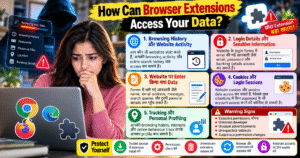
🌐 How Can Browser Extensions Access Your Data?
Browser extensions are small tools that add extra features to browsers like Google Chrome, Microsoft Edge, and Firefox. While many extensions are useful for productivity, ad blocking, and password management, some may misuse their permissions to collect personal information, track browsing activity, or expose sensitive data.
🔍 1. Browsing History and Website Activity
Some extensions with broad permissions can access information about the websites you visit, depending on their configuration and granted access. Malicious extensions may misuse this data to track your online activities, build user profiles, or share browsing information without proper consent.
🔑 2. Login Details and Sensitive Information
Extensions with permission to read or modify website content may be able to access information entered into webpages, including personal details and, in some situations, login information. This creates a risk when using suspicious extensions on banking, email, or shopping websites.
📋 3. Data Entered on Websites
Some extensions can read webpage content or interact with forms on websites where they have permission. If misused, this access could expose names, email addresses, search queries, messages, and other information entered into webpages.
🍪 4. Cookies and Session Information
Certain extensions may access cookies or related website data if the browser grants the required permissions. Stolen session information can sometimes help attackers access an account without knowing its password, depending on the security protections in place.
📍 5. Tracking and Personal Profiling
Some extensions collect browsing patterns, search activity, and website interactions to create user profiles. Although some data collection supports legitimate features, excessive or undisclosed tracking can threaten your privacy.
⚠️ Practical Warning Signs
- 🚨 Excessive Permissions: A simple extension requests access to data across all websites.
- 🔄 Unexpected Behaviour: Your browser redirects to unfamiliar websites or displays unusual advertisements.
- 🐢 Slow Performance: Your browser suddenly becomes slower after installing an extension.
- 🔐 Unknown Developer: The publisher has limited information, suspicious reviews, or an unclear privacy policy.
- 🔄 Unexpected Updates: An extension changes its behaviour or requests new permissions without a clear reason.
🛡️ How to Protect Your Browser Data
- ✅ Install extensions only from trusted sources and verify the developer.
- 🔍 Review permissions before installation and whenever they change.
- 🚫 Remove extensions you no longer use or do not recognise.
- 🔒 Avoid granting access to all websites unless the feature genuinely requires it.
- 📲 Keep your browser updated and review its extension settings regularly.
- 🔐 Use trusted password managers and multi-factor authentication to strengthen account security.
For Chrome: Open chrome://extensions/, select an extension, and review its details and site access permissions.
✅ Conclusion
Browser extensions can improve your browsing experience, but excessive permissions or malicious code may expose your personal information. The actual data an extension can access depends on its permissions, browser security controls, and how the extension is designed.
🌐 How Can Browser Extensions Access Your Data?
Browser extensions छोटे software tools होते हैं, जो Google Chrome, Microsoft Edge और Firefox जैसे browsers में extra features जोड़ते हैं। ये productivity बढ़ाने, ads block करने और passwords manage करने में मदद करते हैं। लेकिन कुछ malicious extensions आपकी browsing activity track कर सकते हैं और personal information का गलत इस्तेमाल कर सकते हैं।
🔍 1. Browsing History और Website Activity
कुछ browser extensions को आपकी visited websites और browsing activity access करने की permission मिल सकती है। Malicious extensions इस data का गलत इस्तेमाल करके आपकी online activities track कर सकते हैं, आपकी interests का profile बना सकते हैं या आपकी information दूसरों के साथ share कर सकते हैं।
🔑 2. Login Details और Sensitive Information
जिन extensions को webpage content पढ़ने या modify करने की permission मिलती है, वे कुछ situations में login forms और उनमें enter की गई sensitive information तक पहुँच सकते हैं। अगर कोई malicious extension banking, email या shopping websites पर इस access का गलत इस्तेमाल करे, तो आपकी privacy और account security खतरे में पड़ सकती है।
📋 3. Website पर Enter किया गया Data
कुछ extensions websites के content और forms के साथ interact कर सकते हैं। अगर उनका गलत इस्तेमाल किया जाए, तो names, email addresses, search queries, messages और दूसरी personal information expose हो सकती है। इसलिए unknown extensions को unnecessary permissions देना risky हो सकता है।
🍪 4. Cookies और Login Sessions
Browser cookies website को आपकी session और preferences maintain करने में मदद करती हैं। कुछ extensions required permissions मिलने पर cookies या related website data access कर सकते हैं। अगर session information चोरी हो जाए, तो कुछ situations में attackers password के बिना भी account access करने की कोशिश कर सकते हैं।
📍 5. Tracking और Personal Profiling
कुछ extensions आपकी browsing habits, search activity और website interactions collect कर सकते हैं। इस information से आपकी interests और online behaviour का profile बनाया जा सकता है। Legitimate extensions भी data collect कर सकते हैं, लेकिन बिना स्पष्ट जानकारी के excessive tracking आपकी privacy के लिए खतरा बन सकती है।
🚨 Practical Warning Signs
- ⚠️ Excessive Permissions: एक simple extension सभी websites का data read करने की permission माँगता है।
- 🔄 Unexpected Redirects: Browser अपने आप unknown websites पर redirect होने लगता है।
- 📢 Unwanted Advertisements: अचानक unusual pop-ups और advertisements दिखाई देने लगते हैं।
- 🔍 Unknown Developer: Developer की details, privacy policy या extension के purpose की जानकारी स्पष्ट नहीं होती।
- 🔐 Suspicious Permission Changes: Extension update के बाद नई permissions माँगी जाती हैं, जिनका उसके काम से स्पष्ट संबंध नहीं होता।
🛡️ Browser Extensions से अपना Data कैसे बचाएँ?
- ✅ Trusted Sources: Extensions केवल trusted sources से install करें और developer की details check करें।
- 🔍 Permission Check: Install करने से पहले देखें कि extension को कौन-से data का access चाहिए।
- 🚫 Unnecessary Extensions हटाएँ: जिन extensions का इस्तेमाल नहीं करते या जिन्हें पहचानते नहीं हैं, उन्हें remove करें।
- 🔒 Limited Website Access: जहाँ संभव हो, extension को केवल जरूरी websites तक access दें।
- 📲 Regular Updates: अपने browser और extensions को updated रखें।
- 🔐 Account Protection: Important accounts पर multi-factor authentication enable करें।
Google Chrome में permissions check करने के लिए: Address bar में chrome://extensions/ open करें, extension की Details पर जाएँ और Site access settings review करें।
✅ Conclusion
Browser extensions आपकी productivity बढ़ा सकते हैं, लेकिन malicious code और excessive permissions आपके personal data को खतरे में डाल सकते हैं। किसी extension को कौन-सा data access मिलेगा, यह उसकी permissions, browser security और उसके design पर निर्भर करता है।