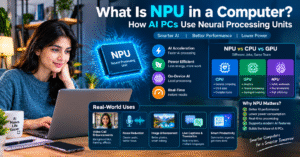
💻 What Is NPU in a Computer? How AI PCs Use Neural Processing Units
🚀 Introduction: Understanding NPU Technology
Artificial Intelligence (AI) is changing the way we use computers. From voice assistants and image editing to real-time language translation and intelligent productivity tools, AI-powered features are becoming an important part of modern computing. To support these features, computer manufacturers are introducing specialized hardware designed to process AI workloads more efficiently. One of the most important developments is the Neural Processing Unit, commonly known as an NPU.
An NPU is a specialized processor designed to accelerate certain artificial intelligence and machine learning operations. Unlike a traditional CPU, which handles a wide range of general computing tasks, or a GPU, which is well suited to parallel processing, an NPU is optimized for supported neural network computations.
Modern AI PCs may include a CPU, GPU, and NPU in the same processor package or system-on-chip. Each component can handle different types of workloads, depending on the computer’s hardware and software.
NPUs can help computers perform supported AI tasks with lower power consumption, making them particularly useful for laptops and other portable devices. They can also enable certain AI features to run locally without sending every request to a remote cloud server.
In this guide, we will explore what an NPU is, how it works, how it differs from a CPU and GPU, and why Neural Processing Units are becoming important in AI-powered computers.
🧠 1. What Is an NPU in a Computer?
NPU stands for Neural Processing Unit. It is a specialized hardware processor designed to accelerate computations commonly used by artificial intelligence and machine learning models.
Many AI models rely on operations involving large numbers of mathematical calculations, including matrix multiplication and tensor operations. An NPU is designed to handle supported operations efficiently, often with a focus on performance per watt.
Traditional CPUs are designed to execute many different types of instructions. They are flexible and essential for running operating systems, applications, and general computing workloads. GPUs can perform many calculations simultaneously, making them useful for graphics, AI model training, and other parallel workloads.
An NPU complements these processors by accelerating selected AI tasks that are supported by its hardware and software environment.
For example, an NPU may help process background blur during video calls, improve microphone noise reduction, or run certain image-recognition features. The exact capabilities depend on the device, model, and applications being used.
It is important to understand that an NPU is not a complete AI system by itself. It needs compatible software, AI models, system memory, and other computing resources to deliver useful results.
✨ Key Features of an NPU
- ⚡ AI Acceleration: Speeds up supported neural network operations.
- 🔋 Power Efficiency: Can execute certain AI workloads using less energy than alternative processors.
- 🎥 Real-Time Processing: Supports AI features such as video effects and audio enhancement.
- 🔒 Local AI Processing: Can help run supported AI applications directly on the device.
- 💻 AI PC Support: Enables selected AI-powered features in compatible computers.
- 🚀 Specialized Computing: Complements CPUs and GPUs rather than replacing them.
⚙️ 2. How Does an NPU Work?
An NPU works by executing mathematical operations commonly used in neural networks. These operations help AI models analyze information, recognize patterns, and generate predictions.
Neural networks consist of interconnected computational units that process data through multiple layers. During inference, the model uses previously learned parameters to produce an output based on new input data.
For example, an image-recognition model may analyze an image and identify objects. A speech-processing model may analyze audio to detect speech or reduce background noise. An NPU can accelerate supported calculations involved in these processes.
The general workflow begins when an application receives input, such as an image, audio signal, or text. The application prepares the data and sends the relevant computations to a suitable processor. If the AI model and its operations are supported, the NPU can perform the assigned workload. The application then uses the results to provide the requested feature.
Some workloads may be divided between the CPU, GPU, and NPU. The CPU manages general application logic, while the NPU accelerates selected neural network operations. The GPU may handle graphics or other parallel computations.
🔄 The NPU Processing Workflow
- Input Data: The computer receives an image, audio signal, video stream, or other information.
- Model Preparation: The application prepares the input for the AI model.
- AI Computation: Supported neural network operations are assigned to the NPU.
- Result Processing: The application receives and interprets the output.
- User Experience: The computer delivers an AI-powered feature, such as improved audio or image recognition.
Actual workflows vary between applications. Some AI tasks may run on the CPU or GPU instead, depending on hardware support, software optimization, and performance requirements.
🖥️ 3. What Is an AI PC?
An AI PC is a computer designed to support AI-powered applications and features through a combination of hardware and software.
Many modern AI PCs include a dedicated NPU alongside a CPU and GPU. However, the term AI PC can be used differently by manufacturers and software providers, and not every computer marketed with AI capabilities has the same hardware or performance.
An AI PC may use local computing resources to process supported AI workloads. This can help reduce dependence on cloud services for certain tasks and may improve responsiveness or privacy when applications are designed to work locally.
Examples of AI-powered features include background noise suppression, automatic video framing, live captions, image enhancement, and selected productivity tools.
Some AI applications still require an internet connection or cloud processing. More demanding generative AI models may also need substantial memory and computing resources that exceed the capabilities of a typical laptop NPU.
Therefore, the practical benefits of an AI PC depend on the NPU’s capabilities, application support, system memory, and the AI tasks you want to perform.
💡 What Makes an AI PC Different?
A traditional computer can already run many AI applications using its CPU, GPU, or cloud-based services. An AI PC with a dedicated NPU adds another processing option for supported workloads.
This can improve energy efficiency for selected AI tasks and help keep the CPU and GPU available for other operations.
For example, a laptop might use its NPU for supported video-call effects while the CPU handles background applications and the GPU manages the display.
This combination allows different hardware components to work together, providing a more flexible computing experience.
🔍 4. NPU vs CPU vs GPU: What Is the Difference?
The CPU, GPU, and NPU are three important types of computing hardware. Although they can overlap in the tasks they support, each is designed with different priorities.
🧠 CPU: Central Processing Unit
The CPU is the general-purpose processor responsible for executing operating system instructions, running applications, managing system operations, and coordinating other hardware components.
It is designed to handle a wide variety of workloads, including tasks that require complex decision-making or sequential processing.
🎮 GPU: Graphics Processing Unit
The GPU is designed to perform graphics calculations and other workloads that can benefit from parallel processing.
It is widely used for gaming, 3D rendering, video processing, scientific computing, and many AI workloads.
🤖 NPU: Neural Processing Unit
The NPU is designed to accelerate supported neural network computations, often with an emphasis on energy efficiency.
It is particularly useful for certain AI inference tasks that can be optimized for the processor’s architecture.
📊 CPU vs GPU vs NPU Comparison
| Feature | CPU | GPU | NPU |
|---|---|---|---|
| Full Form | Central Processing Unit | Graphics Processing Unit | Neural Processing Unit |
| Main Purpose | General computing | Graphics and parallel computing | Supported AI and neural network workloads |
| Design Focus | Flexibility and control | Parallel computation | Efficient AI computation |
| Common Uses | Operating systems, applications, logic | Gaming, rendering, AI workloads | AI inference, audio enhancement, selected AI features |
| AI Capabilities | Can run many AI tasks | Can accelerate many AI workloads | Accelerates supported neural network operations |
| Power Efficiency | Depends on workload | Depends on workload | Often optimized for efficient supported AI tasks |
| Software Support | Broad general-purpose support | Graphics and computing frameworks | Requires compatible AI software and runtime support |
No processor is automatically the fastest or most efficient for every AI task. Performance depends on the model, hardware implementation, memory bandwidth, precision, and software optimization.
🔋 5. Why Are NPUs Important for Power Efficiency?
Power efficiency is one of the main reasons NPUs are being integrated into modern laptops and portable computers.
AI applications can perform many calculations, and continuously running these workloads on a general-purpose processor may consume significant power. For certain supported tasks, an NPU can perform the required calculations more efficiently.
This is especially useful for laptops, where battery life is an important consideration.
For example, a computer may need to apply background blur, adjust camera framing, or suppress background noise during a long video conference. When the application supports NPU acceleration, the NPU may handle these operations while the CPU and GPU remain available for other tasks.
The potential benefit depends on the specific hardware and workload. An NPU does not guarantee longer battery life in every situation, and poorly optimized software may not use it effectively.
Other factors, including display brightness, processor activity, wireless connectivity, and battery capacity, also influence battery life.
⚡ Benefits of Efficient AI Processing
- 🔋 Potentially lower energy consumption for supported AI tasks.
- 💻 Improved suitability for continuous AI features on laptops.
- 🌡️ Potentially less heat generation for certain workloads.
- 🧠 More efficient use of available computing resources.
- 🚀 The ability to run selected AI features in the background.
🎥 6. Real-World Uses of NPUs in Computers
NPUs are becoming useful in everyday computing because many modern applications include AI-powered features.
Their practical value depends on whether an application supports the particular NPU and whether the relevant workload can be accelerated by it.
📹 AI-Powered Video Calls
During video calls, supported AI features may use an NPU to blur the background, keep the speaker centered, or reduce unwanted visual distractions.
This can make video meetings more professional without requiring the user to make manual adjustments.
🎙️ Intelligent Audio Enhancement
An NPU can accelerate supported audio-processing models that reduce background noise or separate speech from unwanted sounds.
These features are useful for remote work, online classes, virtual meetings, and content creation.
🖼️ Image Enhancement and Recognition
Some applications use AI to improve images, recognize objects, or perform selected image-processing operations.
An NPU may accelerate these features when the software and model are compatible with the hardware.
📝 Live Captions and Speech Processing
Supported speech models can convert spoken language into text, assist with transcription, or provide selected language-processing features.
Some applications can perform these tasks locally, while others rely on cloud-based processing.
🔎 Intelligent Productivity Tools
AI-powered productivity software may use local processing for selected summarization, classification, or content-analysis tasks.
However, more demanding generative AI features may require a GPU, substantial system memory, or a cloud service.
These examples demonstrate that NPUs can support a wide range of AI experiences, but availability varies across computers and applications.
🔒 7. NPU and On-Device AI: Privacy and Security
One important advantage of on-device AI is the ability to process certain information locally rather than sending every input to a remote server.
For example, a compatible application may process audio or images directly on a computer using its available hardware. This can reduce the need to transfer some sensitive information over the internet.
Local processing may also reduce latency because the application does not need to wait for a remote server to process every request.
However, having an NPU does not automatically make a computer more secure or private.
Some applications still send data to cloud services, even when the device contains an NPU. The application’s privacy policy, configuration, data-handling practices, and network behavior determine how information is processed.
Users should review application permissions and privacy settings, especially when working with confidential documents, business information, or personal recordings.
🛡️ Key Privacy Considerations
- Check whether an application processes data locally or in the cloud.
- Review the application’s privacy policy and permissions.
- Keep your operating system and applications updated.
- Use appropriate security controls for sensitive information.
- Do not assume that every AI feature works offline simply because your computer has an NPU.
An NPU can enable local AI processing, but responsible software design and appropriate security practices remain essential.
💻 8. Do You Need an NPU in Your Next Laptop?
Whether you need an NPU depends on how you use your computer.
If your daily work involves web browsing, document editing, online classes, email, and basic office applications, you may not need a dedicated NPU. Many traditional computers can perform these tasks efficiently.
However, an NPU may be useful if you regularly use compatible AI-powered productivity tools, video-call enhancements, local speech processing, or other supported AI applications.
Students, professionals, developers, and content creators may benefit from an NPU when their preferred software takes advantage of it.
Before purchasing an AI PC, consider the following factors:
1. NPU Performance: Check the supported AI performance specifications and the workloads for which the NPU is optimized.
2. Application Compatibility: Confirm that the software you use can take advantage of the NPU.
3. System Memory: AI applications may require substantial memory, especially when working with larger models.
4. Battery Life: Review independent battery tests rather than assuming an NPU automatically provides longer battery life.
5. Processor and GPU: Evaluate the complete system, including the CPU, GPU, storage, and cooling.
6. Budget: Compare the overall price and practical benefits with those of computers that do not include a dedicated NPU.
An NPU is an important feature to consider, but it should not be the only factor in choosing a laptop.
🧑💻 9. NPU Technology for Developers
NPUs also create new opportunities for software developers who want to build AI-powered applications.
Developers can use compatible software frameworks, libraries, and runtime environments to execute supported machine learning models on an NPU.
The exact development process depends on the processor vendor, operating system, programming framework, and model format.
For example, developers may optimize a trained neural network for local inference and use a supported runtime to execute it on compatible hardware.
However, deploying an AI model on an NPU can involve additional steps, including model conversion, quantization, operator compatibility checks, and performance testing.
Quantization reduces the numerical precision used by a model, potentially lowering memory requirements and improving performance. Whether it improves results depends on the model, hardware, and implementation.
Developers should also consider whether an application needs to support multiple processor architectures. A robust application may use an NPU when available and fall back to a CPU, GPU, or cloud service when necessary.
🛠️ Important Skills for NPU Development
- Python programming and machine learning fundamentals.
- Understanding neural networks and AI inference.
- Familiarity with model optimization and quantization.
- Experience with supported AI frameworks and runtimes.
- Knowledge of CPU, GPU, and NPU performance differences.
- Testing and debugging across different hardware platforms.
As AI PCs become more common, understanding hardware acceleration can help developers build applications that make better use of local computing resources.
🔮 10. The Future of NPU Technology
NPU technology is likely to become increasingly important as more applications incorporate AI features.
Processor manufacturers are developing hardware that can accelerate AI inference while balancing power consumption, memory requirements, and cost.
Future computers may use increasingly capable NPUs for speech processing, image analysis, intelligent productivity features, and other supported local AI workloads.
Software developers will also continue improving the way applications distribute tasks across CPUs, GPUs, and NPUs.
However, an NPU will not replace every other processor. CPUs will remain essential for general computing, while GPUs will continue to play important roles in graphics, parallel computing, and demanding AI workloads.
The best approach is to use each processor for the tasks it handles most effectively.
As hardware and software ecosystems mature, AI PCs may provide more responsive local AI features, better power efficiency for supported workloads, and additional options for processing information directly on the device.
The actual benefits will continue to depend on the quality of the hardware, application support, and the types of AI tasks users perform.
🎯 Conclusion: Why NPUs Matter in Modern Computers
A Neural Processing Unit is a specialized processor designed to accelerate supported artificial intelligence and machine learning operations.
💻 What Is NPU in a Computer? How AI PCs Use Neural Processing Units
🚀 Introduction: NPU Technology क्या है?
आज के समय में Artificial Intelligence (AI) हमारी Computer Technology को तेजी से बदल रही है। पहले Computer का इस्तेमाल मुख्य रूप से typing, browsing, gaming और office work के लिए किया जाता था, लेकिन अब AI की मदद से Computers कई intelligent tasks भी perform कर सकते हैं। जैसे कि voice recognition, background noise removal, image enhancement, live captions और smart productivity tools।
इसी बदलती Technology में एक important hardware component है NPU (Neural Processing Unit)। यह एक special processor होता है, जिसे Artificial Intelligence और Machine Learning से जुड़े कुछ tasks को efficiently process करने के लिए design किया जाता है।
आजकल कई modern laptops और AI PCs में CPU, GPU और NPU तीनों का इस्तेमाल किया जाता है। इनका काम अलग-अलग होता है। CPU Computer के general tasks को handle करता है, GPU graphics और parallel computing में मदद करता है, जबकि NPU supported AI calculations को efficiently perform करने के लिए बनाया जाता है।
NPU की मदद से कुछ AI features Computer पर ही run हो सकते हैं। इससे कुछ situations में cloud services पर dependency कम हो सकती है और power consumption को भी बेहतर तरीके से manage किया जा सकता है।
इस article में हम आसान भाषा में समझेंगे कि NPU क्या है, यह कैसे काम करता है, CPU और GPU से कैसे अलग है, और AI PCs में इसका इस्तेमाल क्यों बढ़ रहा है।
🧠 1. What Is an NPU in a Computer?
NPU का full form Neural Processing Unit है। यह एक specialized processor होता है, जिसे Neural Networks और Artificial Intelligence से जुड़े specific mathematical operations को accelerate करने के लिए design किया जाता है।
AI Models को काम करने के लिए कई calculations करनी पड़ती हैं। उदाहरण के लिए, जब कोई AI system image को पहचानता है, speech को text में convert करता है या background noise को remove करता है, तब उसे data को process करके patterns पहचानने होते हैं।
NPU ऐसे supported calculations को efficiently execute करने में मदद कर सकता है।
आसान शब्दों में समझें, तो NPU Computer का ऐसा component है जो कुछ AI-related tasks को तेज और energy-efficient तरीके से perform करने के लिए बनाया जाता है।
उदाहरण के लिए, आप अपने Laptop पर Video Call कर रहे हैं। अगर आपका Laptop और Video Calling Software NPU acceleration support करते हैं, तो NPU background blur, noise reduction या camera effects जैसे कुछ AI features को process करने में मदद कर सकता है।
हालाँकि, हर Computer में NPU नहीं होता और हर AI application इसका इस्तेमाल नहीं करती। इसका actual benefit Hardware, Software और AI Model की compatibility पर depend करता है।
✨ NPU की Main Features
- ⚡ AI Acceleration: Supported AI calculations को efficiently process करने में मदद करता है।
- 🔋 Power Efficiency: कुछ AI tasks को कम energy में perform कर सकता है।
- 🎥 Real-Time Processing: Supported video और audio effects को process करने में मदद करता है।
- 🔒 On-Device AI: Compatible applications में AI processing को Computer पर ही run करने की सुविधा दे सकता है।
- 💻 AI PC Support: Modern AI-powered features को support करता है।
- 🚀 Specialized Computing: CPU और GPU के साथ मिलकर Computer की processing capabilities को बढ़ाता है।
याद रखें, NPU खुद से कोई complete AI system नहीं है। इसे काम करने के लिए compatible Software, AI Models और दूसरे Computing Resources की जरूरत होती है।
⚙️ 2. How Does an NPU Work?
NPU मुख्य रूप से उन mathematical calculations को accelerate करता है, जिनका इस्तेमाल AI Models और Neural Networks में होता है।
Neural Network एक ऐसा computational system है, जो data से patterns पहचानने और predictions generate करने के लिए बनाया जाता है। इसे Images, Audio, Video और दूसरे प्रकार के Data को process करने के लिए train किया जा सकता है।
जब कोई AI application काम करती है, तो सबसे पहले उसे Input Data मिलता है। इसके बाद Software उस Data को AI Model के लिए prepare करता है। अगर Model और उसके Operations NPU पर supported हैं, तो संबंधित calculations NPU पर execute की जा सकती हैं।
Processing पूरी होने के बाद Application को Result मिलता है, जिसका इस्तेमाल करके वह User को output दिखाती है।
उदाहरण के लिए, अगर आप Online Meeting में Background Blur इस्तेमाल कर रहे हैं, तो AI Model Camera की Image को analyze कर सकता है और व्यक्ति तथा Background के बीच अंतर पहचान सकता है। Supported System में NPU इस Processing को accelerate करने में मदद कर सकता है।
🔄 NPU कैसे काम करता है? Step-by-Step
1. Input Data: Computer को Image, Audio, Video या कोई दूसरा Data मिलता है।
2. Data Processing: Application Input को AI Model के अनुसार तैयार करती है।
3. AI Computation: Supported Neural Network Operations को NPU पर process किया जाता है।
4. Result Generation: AI Model के Processing Results Application को मिलते हैं।
5. Final Output: Computer Background Blur, Noise Reduction या Image Recognition जैसा AI Feature provide करता है।
हर Application का Processing Method अलग हो सकता है। कुछ Tasks CPU या GPU पर भी चल सकते हैं, क्योंकि हर AI Model और Operation NPU के लिए optimized नहीं होता।
🖥️ 3. What Is an AI PC?
AI PC एक ऐसा Computer होता है, जिसे Artificial Intelligence से जुड़े Features और Applications को support करने के लिए बनाया जाता है।
आजकल कई AI PCs में CPU, GPU और Dedicated NPU दिया जाता है। हालाँकि, AI PC की definition अलग-अलग manufacturers और software platforms के अनुसार बदल सकती है। इसलिए केवल AI PC का नाम देखकर यह assume नहीं करना चाहिए कि हर Computer में समान AI Capabilities होंगी।
AI PC में कुछ AI Tasks को Local Hardware पर run किया जा सकता है। इसका फायदा यह है कि compatible Applications को हर काम के लिए Remote Server पर depend नहीं रहना पड़ता।
उदाहरण के लिए, कुछ Computers में AI की मदद से Video Calls के दौरान Background Blur, Automatic Camera Framing, Microphone Noise Reduction और Live Captions जैसे Features उपलब्ध हो सकते हैं।
कुछ AI Features Internet के बिना भी काम कर सकते हैं, जबकि दूसरे Features के लिए Cloud Processing या Internet Connection की जरूरत पड़ सकती है।
इसलिए AI PC खरीदने से पहले यह देखना जरूरी है कि उसमें कौन-सा Processor है, NPU कितना capable है और आपके काम के Software में उसका Support उपलब्ध है या नहीं।
💡 AI PC और Normal PC में क्या अंतर है?
Normal Computer भी AI Applications को CPU या GPU की मदद से run कर सकता है। लेकिन Dedicated NPU वाला AI PC supported AI Workloads को process करने के लिए एक additional hardware option provide करता है।
इससे कुछ AI Tasks को efficiently run किया जा सकता है और CPU तथा GPU को दूसरे कामों के लिए available रखा जा सकता है।
उदाहरण के लिए, एक Laptop Video Call के दौरान NPU से supported AI Effects process कर सकता है, जबकि CPU Background Applications को handle करता है और GPU Display से जुड़े काम करता है।
इस तरह Computer के अलग-अलग components मिलकर बेहतर Computing Experience देने में मदद करते हैं।
🔍 4. NPU vs CPU vs GPU: क्या अंतर है?
Computer में CPU, GPU और NPU तीन important processing components हैं। इन तीनों का काम अलग-अलग होता है, हालाँकि कुछ situations में इनके functions overlap भी कर सकते हैं।
अगर आप Computer Hardware सीख रहे हैं, तो इन तीनों के बीच का अंतर समझना बहुत जरूरी है।
🧠 CPU — Central Processing Unit
CPU को Computer का General-Purpose Processor कहा जाता है। यह Operating System चलाने, Applications execute करने, Instructions process करने और System के अलग-अलग Components को manage करने का काम करता है।
CPU कई तरह के Tasks handle कर सकता है, इसलिए इसे Computer का सबसे important processing component माना जाता है।
🎮 GPU — Graphics Processing Unit
GPU को मुख्य रूप से Graphics Processing और Parallel Computing के लिए design किया जाता है।
Gaming, 3D Rendering, Video Processing और कई AI Workloads में GPU का महत्वपूर्ण role होता है। यह एक साथ बहुत सारे calculations perform करने के लिए उपयोगी हो सकता है।
🤖 NPU — Neural Processing Unit
NPU को Supported AI और Neural Network Operations को efficiently execute करने के लिए design किया जाता है।
इसका इस्तेमाल AI Inference, Audio Enhancement, Image Recognition और कुछ अन्य AI Features में किया जा सकता है।
📊 CPU vs GPU vs NPU Comparison
| Feature | CPU | GPU | NPU |
|---|---|---|---|
| Full Form | Central Processing Unit | Graphics Processing Unit | Neural Processing Unit |
| Main Work | General Computing | Graphics और Parallel Computing | Supported AI Processing |
| Common Uses | Applications, Operating System | Gaming, Rendering, AI | AI Inference, Audio और Image Processing |
| Main Strength | Flexibility | Parallel Processing | Efficient Supported AI Operations |
| AI Support | कई AI Tasks चला सकता है | कई AI Workloads accelerate कर सकता है | Supported Neural Network Operations accelerate करता है |
| Power Efficiency | Workload पर depend करती है | Workload पर depend करती है | कुछ AI Tasks के लिए optimize किया जाता है |
Simple Example: CPU को Manager की तरह समझ सकते हैं, जो अलग-अलग कामों को manage करता है। GPU को ऐसी Team की तरह समझें, जो एक साथ कई calculations कर सकती है। NPU को ऐसी Specialized Team समझें, जो कुछ AI-related calculations को efficiently perform करने के लिए बनाई गई है।
हालाँकि, किसी भी Processor की Performance उसके Model, Architecture, Software और Workload पर depend करती है।
🔋 5. NPU Power Efficiency के लिए क्यों Important है?
NPU की एक महत्वपूर्ण खासियत यह है कि इसे कुछ AI Workloads को efficiently process करने के लिए design किया जाता है।
जब Computer पर AI Applications लगातार चलती हैं, तो Processing के लिए Power की जरूरत होती है। अगर कोई Supported AI Task NPU पर efficiently execute हो सकता है, तो कुछ situations में CPU या GPU के मुकाबले Energy Consumption कम हो सकती है।
यह खासकर Laptops और Battery-Powered Devices के लिए useful हो सकता है।
उदाहरण के लिए, अगर आप कई घंटों तक Online Meetings करते हैं, तो आपका Laptop Background Blur, Camera Framing और Noise Reduction जैसे Features इस्तेमाल कर सकता है। अगर ये Features NPU Acceleration Support करते हैं, तो NPU इनका कुछ Processing Work संभाल सकता है।
इससे CPU और GPU दूसरे Tasks पर काम कर सकते हैं।
हालाँकि, इसका मतलब यह नहीं है कि NPU होने से हर Laptop की Battery Life अपने आप बढ़ जाएगी। Battery Performance Display Brightness, Processor Usage, Software Optimization, Network Connectivity और Battery Capacity पर भी depend करती है।
⚡ NPU के Power Efficiency Benefits
- 🔋 Supported AI Tasks में Energy Consumption कम करने की संभावना।
- 💻 Laptops में AI Features को efficiently run करने में मदद।
- 🌡️ कुछ Workloads में Heat Generation कम करने की संभावना।
- 🧠 CPU और GPU के Workload को बेहतर तरीके से distribute करने में मदद।
- 🚀 Background में चलने वाले Supported AI Features के लिए Efficient Processing।
🎥 6. Computers में NPU के Real-World Uses
NPU की Technology केवल Technical Research तक सीमित नहीं है। इसका इस्तेमाल कई ऐसे AI Features में किया जा सकता है, जिन्हें लोग रोजाना इस्तेमाल करते हैं।
हालाँकि, किसी Feature में NPU का इस्तेमाल होगा या नहीं, यह Device और Software Support पर depend करता है।
📹 1. AI Video Calls
आजकल कई Video Calling Applications में Background Blur, Automatic Framing और Eye Contact Effects जैसे Features मिलते हैं।
इनमें से कुछ Features AI Models का इस्तेमाल करते हैं। Compatible Hardware और Software होने पर NPU इनकी Processing में मदद कर सकता है।
यह Feature Online Meetings, Remote Work और Online Classes के लिए उपयोगी हो सकता है।
🎙️ 2. Background Noise Reduction
अगर आप घर से काम करते हैं या Online Classes लेते हैं, तो आसपास की आवाजें आपकी Meeting को Disturb कर सकती हैं।
AI-Based Noise Reduction Background की Unwanted Sounds को पहचानकर उन्हें कम करने में मदद करता है।
कुछ Compatible Systems में NPU Audio Processing से जुड़े इन Tasks को accelerate कर सकता है, जिससे Voice Communication बेहतर हो सकती है।
🖼️ 3. AI Image Enhancement
Image Enhancement में AI की मदद से Photos की Quality Improve करना, Objects को पहचानना और कुछ Editing Tasks को automate करना शामिल हो सकता है।
Compatible Software में NPU कुछ Image Processing Operations को efficiently execute करने में मदद कर सकता है।
यह Feature Photographers, Content Creators और सामान्य Computer Users के लिए उपयोगी हो सकता है।
📝 4. Live Captions और Speech Recognition
Speech Recognition Technology बोले गए Words को Text में Convert करने में मदद करती है।
कुछ Applications Speech-to-Text, Live Captions और Language Processing जैसे Features provide करती हैं।
अगर संबंधित AI Model और Application NPU Support करते हैं, तो इन Tasks की Processing Computer पर ही की जा सकती है। कुछ दूसरी Applications Cloud Services का इस्तेमाल भी करती हैं।
💼 5. AI Productivity Tools
AI Productivity Tools का इस्तेमाल Documents को Summarize करने, Information को Organize करने और कुछ Repetitive Tasks को आसान बनाने के लिए किया जाता है।
कुछ छोटे AI Models Local Hardware पर run किए जा सकते हैं, जबकि बड़े Generative AI Models के लिए Powerful GPU, ज्यादा Memory या Cloud Computing की जरूरत हो सकती है।
इसलिए हर AI Productivity Feature NPU पर ही चलेगा, ऐसा जरूरी नहीं है।
🔒 7. NPU और On-Device AI: Privacy के लिए क्या फायदा है?
On-Device AI का मतलब है कि AI Processing सीधे आपके Computer या Device पर की जाती है, बजाय हर Request को Remote Server पर भेजने के।
अगर कोई Compatible Application Local Processing Support करती है, तो वह कुछ Images, Audio या दूसरे Data को आपके Computer पर ही process कर सकती है।
इससे कुछ Situations में Internet पर Data भेजने की जरूरत कम हो सकती है और Response Time भी बेहतर हो सकता है।
उदाहरण के लिए, कोई Compatible Speech Recognition Application आपके Computer पर ही Audio को Text में Convert कर सकती है। इससे हर बार Audio को Cloud Server पर भेजना जरूरी नहीं होगा।
लेकिन यहाँ एक महत्वपूर्ण बात समझना जरूरी है: केवल NPU होने से Computer पूरी तरह Secure या Private नहीं हो जाता।
कुछ Applications NPU होने के बावजूद Data को Cloud Services पर भेज सकती हैं। इसलिए यह देखना जरूरी है कि Application Data को कैसे Process और Store करती है।
🛡️ Privacy के लिए Important Tips
- 🔐 Application की Privacy Policy जरूर पढ़ें।
- 💻 Check करें कि AI Feature Local Processing करता है या Cloud Processing।
- ⚙️ Software Permissions और Privacy Settings को Review करें।
- 🔄 Operating System और Applications को Updated रखें।
- 📁 Sensitive Documents और Personal Information को Process करते समय सावधानी रखें।
NPU Local AI Processing को संभव बनाने में मदद कर सकता है, लेकिन Privacy बनाए रखने के लिए सही Software और Security Practices भी जरूरी हैं।
💻 8. क्या आपको अगला Laptop NPU वाला खरीदना चाहिए?
अगर आप नया Laptop खरीदने की Planning कर रहे हैं, तो NPU एक ऐसा Feature है जिस पर ध्यान दिया जा सकता है। लेकिन हर User के लिए Dedicated NPU जरूरी नहीं है।
अगर आपका काम सामान्य Browsing, Documents, Online Classes, Emails और Office Applications तक सीमित है, तो बिना Dedicated NPU वाला Computer भी आपकी जरूरतें पूरी कर सकता है।
दूसरी तरफ, अगर आप नियमित रूप से Compatible AI Tools, Video Call Effects, Local Speech Processing या AI-Based Productivity Applications इस्तेमाल करते हैं, तो NPU आपके लिए उपयोगी हो सकता है।
🎯 Laptop खरीदते समय इन बातों का ध्यान रखें
1. NPU Performance: Processor की AI Performance और Supported Features को Check करें।
2. Software Compatibility: सुनिश्चित करें कि आपके जरूरी Applications NPU को Support करते हैं।
3. RAM और Memory: AI Applications को चलाने के लिए पर्याप्त RAM और Memory महत्वपूर्ण हैं।
4. Battery Life: केवल NPU के आधार पर निर्णय न लें। Real-World Battery Tests भी देखें।
5. CPU और GPU: पूरे System की Performance को समझें, क्योंकि Gaming, Editing और Software Development में इनकी भूमिका महत्वपूर्ण होती है।
6. Budget: अपने Budget के अनुसार Features और Performance की तुलना करें।
7. Future Requirements: अगर आने वाले समय में आप AI Tools का ज्यादा इस्तेमाल करना चाहते हैं, तो NPU वाला Laptop एक उपयोगी विकल्प हो सकता है।
आखिर में, Laptop खरीदने का निर्णय अपनी जरूरतों, Budget और Software Compatibility को देखकर ही लेना चाहिए।
🧑💻 9. Software Developers के लिए NPU Technology
NPU Technology Software Developers के लिए भी नए Opportunities लेकर आ रही है। Developers ऐसी Applications बना सकते हैं, जो Supported Hardware पर AI Models को Efficiently Run करें।
इसके लिए AI Frameworks, Libraries और Compatible Runtime Environments का इस्तेमाल किया जा सकता है।
उदाहरण के लिए, Developer एक Machine Learning Model को Train करने के बाद उसे Optimize कर सकता है, ताकि वह Compatible NPU पर Inference के लिए इस्तेमाल हो सके।
हालाँकि, NPU पर AI Model Deploy करने के लिए कई Technical Steps की जरूरत हो सकती है। इसमें Model Conversion, Quantization, Operator Compatibility और Performance Testing शामिल हैं।
Quantization एक ऐसी Technique है, जिसमें Model की Calculations के लिए कम Numerical Precision का इस्तेमाल किया जा सकता है। इससे कुछ Models की Memory Requirements कम हो सकती हैं और Performance बेहतर हो सकती है, लेकिन परिणाम Hardware और Model पर depend करते हैं।
Developers को यह भी ध्यान रखना चाहिए कि सभी Users के पास एक जैसा Hardware नहीं होता। इसलिए Application को CPU, GPU या Cloud Processing जैसे Alternative Options भी देने पड़ सकते हैं।
🛠️ NPU Development के लिए Useful Skills
- 🐍 Python Programming और Machine Learning Fundamentals।
- 🧠 Neural Networks और AI Inference की समझ।
- ⚙️ Model Optimization और Quantization।
- 💻 AI Frameworks और Runtime Environments का ज्ञान।
- 🔍 CPU, GPU और NPU के बीच Performance Differences की समझ।
- 🧪 Testing, Debugging और Hardware Compatibility।
अगर आप Software Development या Artificial Intelligence में Career बनाना चाहते हैं, तो NPU Technology को समझना आपके Technical Knowledge को मजबूत कर सकता है।
🔮 10. NPU Technology का Future क्या है?
Artificial Intelligence का इस्तेमाल लगातार बढ़ रहा है। इसी वजह से Computer Manufacturers ऐसे Hardware पर काम कर रहे हैं, जो AI Tasks को अधिक Efficient तरीके से Process कर सके।
आने वाले समय में NPUs का इस्तेमाल अधिक AI Applications में देखने को मिल सकता है। इनमें Speech Processing, Image Recognition, Intelligent Productivity Tools और Local AI Inference जैसे Use Cases शामिल हो सकते हैं।
इसके साथ ही Software Developers भी Applications को इस तरह Optimize कर सकते हैं कि वे CPU, GPU और NPU के बीच Workloads को बेहतर तरीके से Distribute कर सकें।
हालाँकि, NPU भविष्य में CPU और GPU को पूरी तरह Replace नहीं करेगा। CPU General Computing के लिए जरूरी रहेगा, जबकि GPU Graphics, Parallel Processing और कई Heavy AI Workloads में महत्वपूर्ण भूमिका निभाता रहेगा।
NPU का मुख्य उद्देश्य Supported AI Tasks को Efficient तरीके से Process करना है।
जैसे-जैसे Hardware और Software बेहतर होंगे, AI PCs में Local AI Features की Capabilities बढ़ सकती हैं। लेकिन वास्तविक Benefits Processor की Performance, Application Support और उपलब्ध Memory पर depend करेंगे।
इसलिए NPU को Modern Computing की एक महत्वपूर्ण Technology के रूप में समझना चाहिए, न कि हर प्रकार के Computing Task का एकमात्र Solution।
🎯 Conclusion: Modern Computers में NPU क्यों Important है?
NPU यानी Neural Processing Unit एक Specialized Processor है, जिसे Artificial Intelligence और Machine Learning से जुड़े Supported Operations को Accelerate करने के लिए बनाया जाता है।