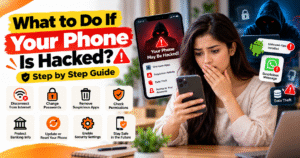
What to Do If Your Phone Is Hacked?
Smartphones store a lot of personal information, including photos, contacts, emails, banking apps, and private messages. If your phone gets hacked, someone may try to access your data, misuse your accounts, or steal sensitive information. Knowing what to do quickly can help reduce the risk and protect your privacy.
🚨 1. Identify the Warning Signs
Some common signs that your phone may be compromised include:
- Battery draining unusually fast.
- Unknown apps appearing on your phone.
- Unexpected pop-ups or suspicious messages.
- Unusual data usage or activity on your accounts.
- Login alerts or OTP messages you did not request.
These signs do not always mean your phone has been hacked, but they are worth investigating.
📵 2. Disconnect from the Internet
If you notice suspicious activity, temporarily turn off Wi-Fi and mobile data to limit potentially unwanted connections. Avoid using the affected phone for banking or other sensitive activities until you have checked it.
If you suspect a SIM swap or that your phone number has been taken over, contact your mobile network provider using another trusted phone.
🔐 3. Change Your Passwords
Using a trusted device, change the passwords for your primary email account, Google or Apple account, banking services, and important social media accounts.
Use strong, unique passwords and enable two-factor authentication wherever possible. Sign out of unfamiliar sessions and review recent account activity.
📱 4. Remove Suspicious Apps
Check your installed apps and uninstall anything you do not recognize or trust. Review app permissions, especially access to your camera, microphone, location, contacts, SMS, and accessibility settings.
On Android, run Google Play Protect and install available security updates. On iPhone, review unfamiliar apps, configuration profiles, and device management settings.
🏦 5. Protect Your Banking Information
If you suspect someone has accessed your banking apps or payment accounts, contact your bank immediately. Block or secure affected payment methods when necessary and review recent transactions.
If money has been stolen through cyber fraud in India, call 1930 as soon as possible and report the incident at the official National Cyber Crime Reporting Portal: cybercrime.gov.in.
🔄 6. Update or Reset Your Phone
Install the latest official operating system and security updates available for your device. If suspicious activity continues, back up essential personal files carefully and consider performing a factory reset.
A factory reset erases local data, so make sure important files are backed up first. Avoid restoring suspicious apps or settings after resetting the phone.
🛡️ Tips to Prevent Phone Hacking
- Download apps only from trusted sources.
- Never share OTPs, passwords, or banking PINs.
- Avoid suspicious links and unknown attachments.
- Use a strong screen lock and biometric security.
- Keep your phone and apps updated.
- Review account login activity regularly.
- Never install unknown APK files or grant unnecessary permissions.
✅ Conclusion
If you think your phone has been hacked, stay calm and take action quickly. Secure your important accounts from a trusted device, remove suspicious apps, check your banking activity, and update your phone’s security settings.
If you notice financial fraud or lose access to important accounts, contact the relevant service provider immediately and report the incident. Taking these steps can help protect your personal information and reduce the risk of further damage.
What to Do If Your Phone Is Hacked?
आज के digital समय में smartphone का इस्तेमाल photos, contacts, emails, banking apps और personal messages के लिए किया जाता है। लेकिन अगर आपका phone hack हो जाए, तो आपकी personal information चोरी होने या आपके accounts का गलत इस्तेमाल होने का खतरा हो सकता है। इसलिए phone में suspicious activity दिखाई देने पर सही कदम उठाना बहुत जरूरी है।
🚨 1. Identify the Warning Signs
अगर आपका phone hack हुआ है या उसमें कोई suspicious activity हो रही है, तो कुछ संकेत दिखाई दे सकते हैं:
- Battery अचानक तेजी से खत्म होना।
- Unknown apps अपने आप दिखाई देना।
- बार-बार suspicious pop-ups या messages आना।
- Mobile data का असामान्य रूप से इस्तेमाल होना।
- Unknown login alerts या OTP messages मिलना।
ध्यान रखें कि ये संकेत हमेशा hacking का मतलब नहीं होते, लेकिन इन्हें नजरअंदाज भी नहीं करना चाहिए।
📵 2. Disconnect Your Phone from the Internet
अगर आपको phone hack होने का शक है, तो कुछ समय के लिए Wi-Fi और mobile data बंद कर दें। इससे कुछ unwanted network connections को सीमित करने में मदद मिल सकती है।
जब तक phone की security check न हो जाए, तब तक उससे banking या sensitive activities करने से बचें। अगर आपको SIM swap का शक है, तो किसी दूसरे trusted phone से अपने mobile network provider से संपर्क करें।
🔐 3. Change Your Passwords
किसी दूसरे सुरक्षित device का इस्तेमाल करके अपने important accounts के passwords बदलें। सबसे पहले email account, Google या Apple account, banking services और social media accounts को सुरक्षित करें।
हर account के लिए strong और अलग password रखें। जहाँ उपलब्ध हो, two-factor authentication enable करें और unknown devices से logout कर दें।
📱 4. Remove Suspicious Apps
अपने phone में installed apps check करें और उन apps को हटाएँ जिन्हें आपने install नहीं किया या जिन पर आपको भरोसा नहीं है।
App permissions भी check करें, खासकर camera, microphone, location, contacts और SMS access। Android phone में Google Play Protect से scan करें और अपने device के security updates install करें।
iPhone में भी unknown apps, configuration profiles और device management settings की जाँच करें।
🏦 5. Protect Your Banking Information
अगर आपको लगता है कि किसी ने आपके banking apps या payment accounts को access किया है, तो तुरंत अपने bank से संपर्क करें। जरूरत पड़ने पर affected payment methods को block करवाएँ और recent transactions check करें।
अगर भारत में आपके साथ online financial fraud हुआ है, तो तुरंत 1930 पर call करें और official National Cyber Crime Reporting Portal cybercrime.gov.in पर complaint दर्ज करें।
🔄 6. Update or Reset Your Phone
अपने phone का operating system और apps latest available version पर update रखें। अगर suspicious activity लगातार हो रही है, तो जरूरी personal files का सुरक्षित backup लेकर factory reset करने पर विचार करें।
ध्यान रखें कि factory reset से phone का local data मिट सकता है। Reset करने से पहले जरूरी files का backup लें और बाद में suspicious apps या settings को restore करने से बचें।
🛡️ Phone Hacking से बचने के Tips
- Apps हमेशा trusted sources से download करें।
- OTP, password और banking PIN किसी के साथ share न करें।
- Unknown links और suspicious attachments पर click न करें।
- Phone में strong screen lock और biometric security लगाएँ।
- Phone और apps को regularly update करें।
- Account login activity समय-समय पर check करें।
- Unknown APK files install न करें और unnecessary permissions न दें।
✅ Conclusion
अगर आपको लगता है कि आपका phone hack हो गया है, तो घबराने के बजाय तुरंत सही steps लें। किसी दूसरे trusted device से अपने important accounts secure करें, suspicious apps हटाएँ और banking activity check करें।
अगर आपके पैसे चोरी हुए हैं या important accounts का access चला गया है, तो संबंधित service provider से तुरंत संपर्क करें और cyber fraud report करें। समय पर उठाए गए कदम आपकी personal information को सुरक्षित रखने और आगे होने वाले नुकसान को कम करने में मदद कर सकते हैं।