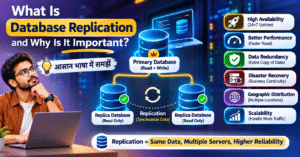
🗄️ What Is Database Replication and Why Is It Important?
📌 Introduction to Database Replication
In today’s digital world, websites, mobile applications, and business systems generate and process large amounts of data every day. Keeping this data available, consistent, and accessible is essential for modern organizations.
Database replication is the process of copying data from one database to another and maintaining those copies as the original data changes. It helps improve data availability, distribute read workloads, and support disaster recovery when a database server experiences a failure.
From e-commerce platforms to banking systems, database replication plays an important role in building reliable and scalable applications.
💡 What Is Database Replication?
Database replication is a technique in which data from a source database is copied and synchronized with one or more destination databases, known as replicas.
When changes occur in the source database, the replication mechanism transfers those changes to the replica databases according to the configured replication method.
For example, imagine an online shopping website that stores customer details, product information, and orders in a primary database. The website can maintain additional database replicas to serve reporting queries or read requests.
This approach can reduce pressure on the primary database and help applications remain available during certain failures.
However, replicas are not always instantly synchronized. The level of consistency depends on the replication architecture and configuration.
⚙️ How Does Database Replication Work?
Database replication generally involves the following steps.
📝 1. Store Data in the Primary Database
The application writes information to the primary database. This may include customer records, product details, payments, or order information.
🔍 2. Detect Database Changes
When a record is inserted, updated, or deleted, the database replication mechanism identifies the change. Depending on the technology, this may involve transaction logs or database-specific replication protocols.
📤 3. Transfer Changes to Replica Databases
The captured changes are transmitted from the primary database to the configured replica servers. The transfer may happen synchronously or asynchronously.
🔄 4. Apply Changes to the Replicas
The replica databases process the incoming changes to maintain a copy of the source data.
📊 5. Serve Application Requests
Depending on the architecture, applications can send write requests to the primary database and distribute read requests across replicas.
This approach can improve read performance and reduce the workload on the primary database. Applications must also account for replication lag and consistency requirements.
🧩 Types of Database Replication
There are several types of database replication. Each has different characteristics, benefits, and limitations.
🔗 1. Synchronous Replication
In synchronous replication, a write operation may wait for confirmation from one or more replicas before the transaction is acknowledged.
This approach can provide stronger data durability guarantees, depending on the database’s implementation and configuration.
Example: A financial application may use synchronous replication to reduce the risk of losing acknowledged transactions during certain failures.
Advantages:
- Stronger consistency or durability guarantees in supported configurations.
- Reduced risk of losing acknowledged writes.
- Useful for applications with strict data protection requirements.
Limitations:
- Increased write latency.
- Network delays can affect performance.
- Replica failures may affect write availability, depending on the configuration.
⚡ 2. Asynchronous Replication
In asynchronous replication, the primary database can acknowledge a write before all replicas have received and applied the change.
This approach generally reduces the waiting time for write operations but introduces the possibility of replication lag.
Example: A news website replicates published articles to additional database servers for read access.
Advantages:
- Lower write latency in many configurations.
- Useful for distributed applications.
- Suitable for scaling read-heavy workloads.
Limitations:
- Replicas may temporarily contain outdated data.
- Recent changes may be missing from a replica if the primary fails before those changes are replicated.
🔄 3. Single-Primary Replication
In single-primary replication, one database server handles writes while one or more replicas maintain copies of its data.
This is a common architecture for applications that need to separate write operations from read workloads.
Example: An e-commerce website writes new orders to a primary database while using replicas for product browsing and reporting queries.
Best suited for: Applications that need a relatively straightforward replication architecture.
🌐 4. Multi-Primary Replication
In multi-primary replication, multiple database nodes can accept write operations, and their changes are synchronized across the system.
This approach can support applications distributed across multiple locations, but it introduces additional complexity.
Example: A distributed application allows users in different regions to write data to separate database nodes.
Advantages:
- Writes can be accepted at multiple locations.
- Can support geographically distributed workloads.
- May improve local write availability in appropriate architectures.
Limitations:
- Conflicting updates must be handled.
- Transaction ordering and consistency require careful design.
- Operational complexity can increase significantly.
📍 5. Snapshot-Based Replication
Snapshot-based replication transfers a copy of data captured at a particular point in time.
It is useful when a system does not need every change to be replicated continuously.
Example: A company copies a database snapshot to a reporting server every night.
Best suited for: Periodic data distribution, reporting environments, and batch-processing workflows.
A snapshot alone does not provide continuous synchronization between snapshots.
🌟 Why Is Database Replication Important?
Database replication offers several benefits for modern applications and businesses.
🛡️ 1. High Availability
Maintaining replicas can help an application continue operating when the primary database experiences a failure. Depending on the architecture, a replica may be promoted to primary through a manual or automated failover process.
🚀 2. Improved Performance
Read requests can be distributed across multiple replicas instead of sending every request to a single database server.
This can improve response times and reduce the primary database’s workload, particularly for read-heavy applications.
💾 3. Data Redundancy
Replication creates additional copies of data, which can improve data availability and provide another source for recovery.
However, replication alone is not a complete backup solution because accidental deletions and corrupted changes may also propagate to replicas.
🌍 4. Geographic Distribution
Organizations can maintain replicas in different geographic locations to support regional applications and improve data access for distributed users.
The actual performance benefits depend on network latency, replica placement, and application design.
🔧 5. Disaster Recovery
A replica can serve as part of a disaster recovery strategy when a primary server or data center becomes unavailable.
Effective recovery also requires monitoring replication lag, testing failover procedures, and defining recovery time and recovery point objectives.
📈 6. Scalability
Adding read replicas can help applications handle increasing read traffic without placing all the workload on the primary database.
However, adding replicas does not automatically increase write capacity, and replication itself requires network, storage, and processing resources.
🏢 Real-World Applications of Database Replication
Database replication is used across many industries and application types.
🛒 E-Commerce Platforms
Online stores can use replicas to serve product catalogues, customer browsing requests, and reporting queries while keeping order writes on a primary database.
🏦 Banking and Financial Systems
Financial institutions may use replication as part of their availability and disaster recovery architecture. These systems require careful attention to transaction consistency, security, durability, and regulatory requirements.
🏥 Healthcare Systems
Healthcare applications can use database replication to improve the availability of authorized medical and administrative information across connected systems. Patient privacy and access controls remain essential.
📊 Business Intelligence and Analytics
Organizations can direct reporting queries to replica databases, reducing the impact of analytical workloads on production systems.
This approach can be useful when building reporting solutions and dashboards with tools such as Power BI.
📱 Social Media Platforms
Social media applications can use replicated databases to serve large numbers of read requests and support distributed application infrastructure.
🔄 Database Replication vs. Database Backup
Database replication and database backup are both important, but they serve different purposes.
| Feature | Database Replication | Database Backup |
|---|---|---|
| Main purpose | Maintain copies of data across database systems | Preserve data for recovery |
| Update frequency | Continuous or configuration-dependent | Scheduled or continuous, depending on the backup method |
| Availability | Can support failover | Usually requires restoration |
| Accidental deletion | May propagate to replicas | An earlier backup may allow recovery |
| Corruption protection | Limited when changes propagate | Independent backups can provide recovery options |
| Typical use | Availability and read scaling | Data protection and recovery |
Important: A reliable database strategy often combines replication with independent backups, recovery testing, and appropriate data retention policies.
💻 Example: Understanding Database Replication
Imagine an application that uses MySQL to store customer information. You want to maintain a primary database and a replica database.
The architecture can be represented as:
Primary Database → Replication Mechanism → Replica Database
The process works as follows:
- A new customer record is inserted into the primary database.
- The database replication mechanism detects the change.
- The change is transmitted to the replica server.
- The replica applies the change to its local data.
- The application can read the replicated record from the replica, subject to replication lag and consistency requirements.
MySQL supports replication features that can be configured for different database topologies. A typical setup may require unique server identifiers, binary logging, replication accounts, network configuration, and appropriate replication commands.
The exact implementation depends on the MySQL version and deployment architecture.
⚠️ Challenges of Database Replication
Although database replication provides many benefits, it also introduces several challenges.
- ⏱️ Replication Lag: Changes may take time to reach replica databases.
- 🔄 Data Consistency: Replicas may temporarily contain different data from the primary database.
- 🌐 Network Failures: Connectivity issues can interrupt replication or increase delays.
- ⚙️ Configuration Complexity: Replication settings and failover procedures must be configured carefully.
- 💰 Infrastructure Costs: Additional servers, storage, networking, and monitoring can increase costs.
- 🔐 Security Risks: Replicated data requires appropriate encryption, permissions, and access controls.
Organizations should monitor replication health, test recovery procedures, and document how failures will be handled.
🎯 Best Practices for Database Replication
Follow these practices to build a reliable replication architecture.
- 📌 Choose the Right Replication Method: Select synchronous or asynchronous replication based on application requirements.
- 📊 Monitor Replication Lag: Track delays between primary database changes and replica updates.
- 🛡️ Maintain Independent Backups: Do not rely on replicas as your only data recovery mechanism.
- 🔐 Secure Database Connections: Use appropriate authentication, encryption, and access permissions.
- 🔄 Test Failover Procedures: Verify that the application can recover correctly when a primary database fails.
- 🧪 Validate Data Consistency: Periodically check whether replicas contain the expected data.
- 📝 Document the Architecture: Record replication settings, recovery procedures, and operational responsibilities.
These practices help improve reliability, security, and maintainability.
📝 Conclusion
Database replication is an important technique for building reliable, scalable, and highly available database systems. By maintaining copies of data across multiple database servers, organizations can distribute read workloads, improve data availability, and support disaster recovery.
Whether you are developing an e-commerce platform, building a financial application, or designing an analytics system, database replication can be valuable when implemented according to your application’s requirements.
For the best results, choose an appropriate replication strategy, monitor consistency and lag, test failover procedures, and maintain independent backups.
❓ Frequently Asked Questions (FAQs)
1. What is database replication?
Database replication is the process of copying and synchronizing data from one database to another database or server.
2. Why is database replication important?
It can improve data availability, distribute read workloads, support disaster recovery, and help applications handle increasing traffic.
3. Does database replication improve performance?
It can improve read performance by distributing queries across multiple replicas. The results depend on the workload and database configuration.
4. Is database replication the same as backup?
No. Replication maintains additional copies of data, while backups preserve data for recovery. Both serve important but different purposes.
5. Which database replication method is best?
There is no single best method for every application. Synchronous replication may suit strict durability requirements, while asynchronous replication may be preferable when lower write latency is important.
6. What is replication lag?
Replication lag is the delay between a change occurring in the primary database and that change being applied to a replica.
7. Does MySQL support database replication?
Yes. MySQL supports database replication, including configurations that use binary logs to transfer database changes between servers.
🗄️ What Is Database Replication and Why Is It Important?
📌 Introduction to Database Replication
In today’s digital world, websites, mobile applications, and business systems generate and process large amounts of data every day. Keeping this data available, consistent, and accessible is essential for modern organizations.
Database replication is the process of copying data from one database to another and maintaining those copies as the original data changes. It helps improve data availability, distribute read workloads, and support disaster recovery when a database server experiences a failure.
From e-commerce platforms to banking systems, database replication plays an important role in building reliable and scalable applications.
💡 What Is Database Replication?
Database replication is a technique in which data from a source database is copied and synchronized with one or more destination databases, known as replicas.
When changes occur in the source database, the replication mechanism transfers those changes to the replica databases according to the configured replication method.
For example, imagine an online shopping website that stores customer details, product information, and orders in a primary database. The website can maintain additional database replicas to serve reporting queries or read requests.
This approach can reduce pressure on the primary database and help applications remain available during certain failures.
However, replicas are not always instantly synchronized. The level of consistency depends on the replication architecture and configuration.
⚙️ How Does Database Replication Work?
Database replication generally involves the following steps.
📝 1. Store Data in the Primary Database
The application writes information to the primary database. This may include customer records, product details, payments, or order information.
🔍 2. Detect Database Changes
When a record is inserted, updated, or deleted, the database replication mechanism identifies the change. Depending on the technology, this may involve transaction logs or database-specific replication protocols.
📤 3. Transfer Changes to Replica Databases
The captured changes are transmitted from the primary database to the configured replica servers. The transfer may happen synchronously or asynchronously.
🔄 4. Apply Changes to the Replicas
The replica databases process the incoming changes to maintain a copy of the source data.
📊 5. Serve Application Requests
Depending on the architecture, applications can send write requests to the primary database and distribute read requests across replicas.
This approach can improve read performance and reduce the workload on the primary database. Applications must also account for replication lag and consistency requirements.
🧩 Types of Database Replication
There are several types of database replication. Each has different characteristics, benefits, and limitations.
🔗 1. Synchronous Replication
In synchronous replication, a write operation may wait for confirmation from one or more replicas before the transaction is acknowledged.
This approach can provide stronger data durability guarantees, depending on the database’s implementation and configuration.
Example: A financial application may use synchronous replication to reduce the risk of losing acknowledged transactions during certain failures.
Advantages:
- Stronger consistency or durability guarantees in supported configurations.
- Reduced risk of losing acknowledged writes.
- Useful for applications with strict data protection requirements.
Limitations:
- Increased write latency.
- Network delays can affect performance.
- Replica failures may affect write availability, depending on the configuration.
⚡ 2. Asynchronous Replication
In asynchronous replication, the primary database can acknowledge a write before all replicas have received and applied the change.
This approach generally reduces the waiting time for write operations but introduces the possibility of replication lag.
Example: A news website replicates published articles to additional database servers for read access.
Advantages:
- Lower write latency in many configurations.
- Useful for distributed applications.
- Suitable for scaling read-heavy workloads.
Limitations:
- Replicas may temporarily contain outdated data.
- Recent changes may be missing from a replica if the primary fails before those changes are replicated.
🔄 3. Single-Primary Replication
In single-primary replication, one database server handles writes while one or more replicas maintain copies of its data.
This is a common architecture for applications that need to separate write operations from read workloads.
Example: An e-commerce website writes new orders to a primary database while using replicas for product browsing and reporting queries.
Best suited for: Applications that need a relatively straightforward replication architecture.
🌐 4. Multi-Primary Replication
In multi-primary replication, multiple database nodes can accept write operations, and their changes are synchronized across the system.
This approach can support applications distributed across multiple locations, but it introduces additional complexity.
Example: A distributed application allows users in different regions to write data to separate database nodes.
Advantages:
- Writes can be accepted at multiple locations.
- Can support geographically distributed workloads.
- May improve local write availability in appropriate architectures.
Limitations:
- Conflicting updates must be handled.
- Transaction ordering and consistency require careful design.
- Operational complexity can increase significantly.
📍 5. Snapshot-Based Replication
Snapshot-based replication transfers a copy of data captured at a particular point in time.
It is useful when a system does not need every change to be replicated continuously.
Example: A company copies a database snapshot to a reporting server every night.
Best suited for: Periodic data distribution, reporting environments, and batch-processing workflows.
A snapshot alone does not provide continuous synchronization between snapshots.
🌟 Why Is Database Replication Important?
Database replication offers several benefits for modern applications and businesses.
🛡️ 1. High Availability
Maintaining replicas can help an application continue operating when the primary database experiences a failure. Depending on the architecture, a replica may be promoted to primary through a manual or automated failover process.
🚀 2. Improved Performance
Read requests can be distributed across multiple replicas instead of sending every request to a single database server.
This can improve response times and reduce the primary database’s workload, particularly for read-heavy applications.
💾 3. Data Redundancy
Replication creates additional copies of data, which can improve data availability and provide another source for recovery.
However, replication alone is not a complete backup solution because accidental deletions and corrupted changes may also propagate to replicas.
🌍 4. Geographic Distribution
Organizations can maintain replicas in different geographic locations to support regional applications and improve data access for distributed users.
The actual performance benefits depend on network latency, replica placement, and application design.
🔧 5. Disaster Recovery
A replica can serve as part of a disaster recovery strategy when a primary server or data center becomes unavailable.
Effective recovery also requires monitoring replication lag, testing failover procedures, and defining recovery time and recovery point objectives.
📈 6. Scalability
Adding read replicas can help applications handle increasing read traffic without placing all the workload on the primary database.
However, adding replicas does not automatically increase write capacity, and replication itself requires network, storage, and processing resources.
🏢 Real-World Applications of Database Replication
Database replication is used across many industries and application types.
🛒 E-Commerce Platforms
Online stores can use replicas to serve product catalogues, customer browsing requests, and reporting queries while keeping order writes on a primary database.
🏦 Banking and Financial Systems
Financial institutions may use replication as part of their availability and disaster recovery architecture. These systems require careful attention to transaction consistency, security, durability, and regulatory requirements.
🏥 Healthcare Systems
Healthcare applications can use database replication to improve the availability of authorized medical and administrative information across connected systems. Patient privacy and access controls remain essential.
📊 Business Intelligence and Analytics
Organizations can direct reporting queries to replica databases, reducing the impact of analytical workloads on production systems.
This approach can be useful when building reporting solutions and dashboards with tools such as Power BI.
📱 Social Media Platforms
Social media applications can use replicated databases to serve large numbers of read requests and support distributed application infrastructure.
🔄 Database Replication vs. Database Backup
Database replication and database backup are both important, but they serve different purposes.
| Feature | Database Replication | Database Backup |
|---|---|---|
| Main purpose | Maintain copies of data across database systems | Preserve data for recovery |
| Update frequency | Continuous or configuration-dependent | Scheduled or continuous, depending on the backup method |
| Availability | Can support failover | Usually requires restoration |
| Accidental deletion | May propagate to replicas | An earlier backup may allow recovery |
| Corruption protection | Limited when changes propagate | Independent backups can provide recovery options |
| Typical use | Availability and read scaling | Data protection and recovery |
Important: A reliable database strategy often combines replication with independent backups, recovery testing, and appropriate data retention policies.
💻 Example: Understanding Database Replication
Imagine an application that uses MySQL to store customer information. You want to maintain a primary database and a replica database.
The architecture can be represented as:
Primary Database → Replication Mechanism → Replica Database
The process works as follows:
- A new customer record is inserted into the primary database.
- The database replication mechanism detects the change.
- The change is transmitted to the replica server.
- The replica applies the change to its local data.
- The application can read the replicated record from the replica, subject to replication lag and consistency requirements.
MySQL supports replication features that can be configured for different database topologies. A typical setup may require unique server identifiers, binary logging, replication accounts, network configuration, and appropriate replication commands.
The exact implementation depends on the MySQL version and deployment architecture.
⚠️ Challenges of Database Replication
Although database replication provides many benefits, it also introduces several challenges.
- ⏱️ Replication Lag: Changes may take time to reach replica databases.
- 🔄 Data Consistency: Replicas may temporarily contain different data from the primary database.
- 🌐 Network Failures: Connectivity issues can interrupt replication or increase delays.
- ⚙️ Configuration Complexity: Replication settings and failover procedures must be configured carefully.
- 💰 Infrastructure Costs: Additional servers, storage, networking, and monitoring can increase costs.
- 🔐 Security Risks: Replicated data requires appropriate encryption, permissions, and access controls.
Organizations should monitor replication health, test recovery procedures, and document how failures will be handled.
🎯 Best Practices for Database Replication
Follow these practices to build a reliable replication architecture.
- 📌 Choose the Right Replication Method: Select synchronous or asynchronous replication based on application requirements.
- 📊 Monitor Replication Lag: Track delays between primary database changes and replica updates.
- 🛡️ Maintain Independent Backups: Do not rely on replicas as your only data recovery mechanism.
- 🔐 Secure Database Connections: Use appropriate authentication, encryption, and access permissions.
- 🔄 Test Failover Procedures: Verify that the application can recover correctly when a primary database fails.
- 🧪 Validate Data Consistency: Periodically check whether replicas contain the expected data.
- 📝 Document the Architecture: Record replication settings, recovery procedures, and operational responsibilities.
These practices help improve reliability, security, and maintainability.
📝 Conclusion
Database replication is an important technique for building reliable, scalable, and highly available database systems. By maintaining copies of data across multiple database servers, organizations can distribute read workloads, improve data availability, and support disaster recovery.
Whether you are developing an e-commerce platform, building a financial application, or designing an analytics system, database replication can be valuable when implemented according to your application’s requirements.
For the best results, choose an appropriate replication strategy, monitor consistency and lag, test failover procedures, and maintain independent backups.
❓ Frequently Asked Questions (FAQs)
1. What is database replication?
Database replication is the process of copying and synchronizing data from one database to another database or server.
2. Why is database replication important?
It can improve data availability, distribute read workloads, support disaster recovery, and help applications handle increasing traffic.
3. Does database replication improve performance?
It can improve read performance by distributing queries across multiple replicas. The results depend on the workload and database configuration.
4. Is database replication the same as backup?
No. Replication maintains additional copies of data, while backups preserve data for recovery. Both serve important but different purposes.
5. Which database replication method is best?
There is no single best method for every application. Synchronous replication may suit strict durability requirements, while asynchronous replication may be preferable when lower write latency is important.
6. What is replication lag?
Replication lag is the delay between a change occurring in the primary database and that change being applied to a replica.
7. Does MySQL support database replication?
Yes. MySQL supports database replication, including configurations that use binary logs to transfer database changes between servers.